
When you buy through our links, Business Insider may earn an affiliate commission. Learn more
The Asus ROG Ally is a strange device. Not only is it a handheld gaming console like the Steam Deck and Nintendo Switch, but it’s also a handheld PC running Windows 11. Stuffing a miniature gaming PC into such a tiny frame is an ambitious idea, but it didn’t pay off at the time of the ROG Ally’s release in 2023.
I won’t mince words: I hated the Asus ROG Ally when I first tested it. It was a buggy mess that couldn’t play games or run Windows apps properly, and it couldn’t even begin to compare to its main competitor, the Steam Deck. But in the time since my first-look article, it’s attracted a dedicated cult following, and Asus has even released a secondary model made for budget users. Despite its initial issues, the ROG Ally has survived.
So what’s changed, and what has Asus done to fix its unique handheld PC? Months after writing off the ROG Ally, I decided to give it another try, and I’ve been pleasantly surprised to find a much better handheld console that’s usually fun to play with. But, some key design flaws and a high price tag still keep it from surpassing its rival handhelds.
The Asus ROG Ally is a gaming PC in a handheld body
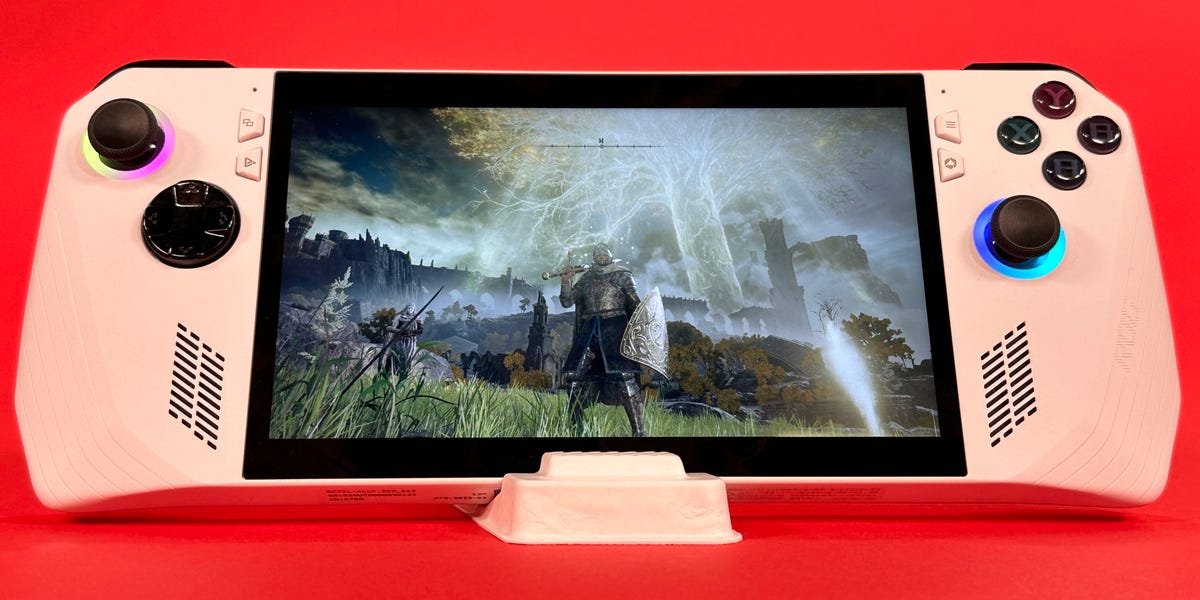
Coming in at less than an inch thick and less than 1.5 pounds, the ROG Ally is a Windows 11 PC by way of the Nintendo Switch. It’s got a 7-inch 1080p touchscreen, surrounded by a sleek white chassis and all the buttons you’d expect to find on a normal gamepad. It’s a gaming console and Windows tablet rolled into one.
The ROG Ally’s visual aesthetic is its best feature. The pure white chassis and black buttons give it a striking design, and the ROG logo on the back, drawn using the exhaust ports, is a clever bit of branding. The small bits of iridescent metal on the sides and rear don’t hurt either. And the customizable RGB rings around the joysticks give the device a classic gaming PC look without going overboard.
In terms of build, the ROG Ally has its pros and cons. It’s incredibly comfortable to hold with shallower handles than the Steam Deck, which lets it sit more naturally in your palms. The handles and triggers also have a coarser grip texture, which I love. It doesn’t get hot, even when under load.
The screen is wonderfully bright and clear, too, which is a staple for Asus products. And the extra paddle buttons on the back are placed just right so you won’t hit them accidentally.
However, the ROG Ally’s other controls aren’t worth raving about. There aren’t any touchpads, and the joysticks are pretty small and cramped compared to the Steam Deck’s. The buttons, bumpers, and D-pad are also just fine, but nothing to get excited about.
If it were its own independent gaming device like the Nintendo Switch, I’d love playing on the ROG Ally. But unfortunately, it’s the ROG Ally’s insistence on being a gaming PC that brings it down.
Decent hardware for the price, but it offers an awkward Windows experience
When it comes to hardware, the ROG Ally isn’t a bad computer at all. If it were a traditional PC, the ROG Ally Z1 Extreme model’s graphical and computing power would be about on par with a budget gaming laptop from around 2021 or a new midrange notebook. I haven’t tested the cheaper Z1 edition, but based on the Z1 Extreme’s performance, I’d expect it to be similar to a budget 2019 laptop.
That isn’t as mediocre as it might sound. High-end gaming hardware can be notoriously chunky and power-hungry, so the fact that Asus has managed to produce such a portable device with that level of performance is pretty amazing. It’s more than enough to browse the internet, watch videos, and use basic productivity software like Microsoft 365 and Adobe Photoshop. That’s a massive step up from the gaming handhelds of the past.
And although it shouldn’t be your device of choice to play intensive games like Cyberpunk 2077, it’s still more than enough to run plenty of major releases at lower settings and pretty much any game with simpler graphics. Midrange titles like Hitman 3 struggled to maintain frame rates at max presets — especially when ray tracing was enabled — but you just need to turn down a few settings to fix that. Popular but low-power games like Rocket League, Overwatch, and Valorant are perfect for it.
And let’s be honest: If you’re doing anything more intensive than that, like video/audio editing or 3D rendering, it’s time to invest in an actual computer. After all, the ROG Ally’s shape makes it very awkward to use as a tablet PC. The screen is too cramped to be comfortable, and using the joystick and triggers as a mouse is frustrating.
If you really want to use the ROG Ally as your main PC, you’re better off using the device’s USB-C port to connect it to an external monitor, mouse, and keyboard. But at that point, why not just buy an actual computer?
The ROG Ally’s PC performance isn’t helped by its USB-C port being its only port. If you have a lot of peripherals, you’ll either need to daisy-chain USB hubs together or buy one really big one with power delivery since the USB-C port is also the charging port.
The ROG Ally’s battery life isn’t great either. Don’t expect it to exceed three hours even when using the device’s power-saving “Silent” mode. You’ll get between an hour and two hours when playing games in “Performance” or “Turbo” mode. It’s not surprising — even the best gaming laptops don’t get much more than that — but it’s a point against the ROG Ally’s portability. It’s also less battery life than the Steam Deck and especially the Switch.
Controls have improved, but it still suffers from key flaws
On release in June 2023, the Asus ROG Ally’s biggest issue was its controls. You simply couldn’t play most Steam and Xbox games on it because the games either wouldn’t recognize the ROG Ally’s buttons or would treat them as random keyboard inputs. This turned the ROG Ally from a Steam Deck competitor into an oversized brick.
I’m happy to report that most of the ROG Ally’s control issues have now been fixed. Every Steam game I launched (that was marked as “Verified” or “Playable” on handheld) worked immediately like it should, recognizing the ROG Ally’s buttons. Some games even adapted to a mix of controls, letting me use the face buttons to select things and the joystick as a mouse. It completely surpassed my expectations.
That said, it’s still not perfect. Some games, especially ones launched from Xbox Game Pass, struggle to understand how the ROG Ally works. For example, Guilty Gear Strive would let me punch and kick, but I couldn’t move. Cozy moving simulator Unpacking worked great, except for when I had to type my character’s name. The game couldn’t recognize that I didn’t have a real keyboard attached, so I had to manually launch Windows’ virtual keyboard and pin it to the side of the screen.
Despite the improvements, these are annoying issues to have on a gaming device. That’s especially true if you compare the ROG Ally to the true king of handheld gaming, the Nintendo Switch, where every game you launch is guaranteed to have working controls right from the start.
And SteamOS on the Steam Deck runs far quicker and easier than the ROG Ally’s Armoury Crate SE app, which you’re meant to use to launch your games and customize the device. Despite being custom-made for the ROG Ally, Armoury Crate doesn’t always respond to the controls either. And at one point, whenever I opened it, an ad for a ROG Ally giveaway popped up and blocked the entire screen. Having to struggle with these bugs just adds a level of friction that other systems don’t have.
The root of this problem is that for all the physical buttons and triggers Asus has put on the device, it’s still just a Windows tablet. It has a bunch of weird bugs and quirks because Windows has those bugs and quirks and because Asus software is notorious for having a janky UI.
Loads of features also still require touchscreen input, which often means you’ll be switching on-the-fly between holding the ROG Ally like a normal controller and tapping the screen. And there’s no way to turn off the screen’s touch features, even when playing a game in Controller Mode.
This proved incredibly annoying in games like Overwatch. If I pushed the right joystick too far in the screen’s direction, my thumb would brush against the display, automatically switching the game to touch controls and sending the camera flying randomly.
Hard to compete with the Steam Deck and Nintendo Switch
While the ROG Ally has its flaws, it’s still a decent gaming machine. But how does it compare to its competitors?
In terms of raw power, the ROG Ally outperforms the Nintendo Switch. But that’s not a surprise since the Switch is years older and hundreds of dollars cheaper. The ROG Ally is also more comfortable in your hands and has a higher-resolution screen. But the Switch is far less buggy, has better battery life, and offers a unique library of ports and exclusive games.
Comparing the ROG Ally to the Steam Deck is tougher. The Steam Deck has a smaller game library since it only officially supports Steam and Itch.io (although you can access non-Steam launchers like Xbox Game Pass with some fiddling). The ROG Ally’s hardware is more powerful, which means higher frame rates at higher settings and the ability to run more intensive programs. It’s also more comfortable to hold and has a higher resolution screen (1080p vs 800p).
That higher resolution screen can hurt the ROG Ally, though. When playing games at 720p, the ROG Ally easily outperforms the Deck — but once you jump to 1080p, that performance drops, often lower than the Deck. Marvel’s Spider-Man Remastered, for example, hits steady 800p frame rates at the “Low” preset on a 1TB Steam Deck OLED, but 1080p needs “Very Low” on the ROG Ally.
The Steam Deck also has longer battery life, usually upwards of three to four hours. That’s not only because of the weaker screen and hardware but also because it’s not running Windows, which has loads of background operations that use up power.
The ROG Ally’s Windows capabilities do set it apart from the others. But even that’s not a clear-cut advantage. Though it’s primarily a gaming machine, the Steam Deck does have its own “Desktop” mode that lets you use it like a regular computer. It runs Linux instead of Windows, but for the basic tasks you’d use a handheld computer for — browsing the internet, using social media, watching videos — it’s just as good.
That brings us to price, which is where the ROG Ally really falters. The ROG Ally Z1 Extreme costs $700, and the budget Z1 model costs $600. That’s a hefty chunk of cash for any gaming system, especially one with as many issues as the ROG Ally. Meanwhile, Switch models range from $200 to $350, and the Steam Deck ranges from $349 to $649.
Should you buy the Asus ROG Ally?
In a vacuum, the Asus ROG Ally is a pretty solid portable console. It’s comfortable, well-designed, and offers surprisingly good hardware and performance for its small size. I certainly enjoyed spending a few hours in bed playing Rocket League and Hitman 3 on it.
And if you’re flexible enough to deal with Windows’ tablet quirks and the constant switching between touchscreen and gamepad controls, it even makes for a uniquely portable PC experience. It also has value as a makeshift gaming PC if you attach it to an external monitor, mouse, and keyboard.
But nothing happens in a vacuum. And the fact is that if I’m presented with a ROG Ally, Steam Deck, and Nintendo Switch and told I can only play with one, the ROG Ally loses that matchup 90% of the time.
When it comes to being a handheld gaming PC, the ROG Ally isn’t better than the Steam Deck. It’s buggier, has no touchpads, and has worse battery life, yet it’s more expensive. Its advantages, like immediate access to Windows apps and slightly higher-end hardware, aren’t worth the disadvantages for most users. The Deck and Switch just offer a smoother experience than the ROG Ally’s. It’s good, but not the best.
The Steam Deck OLED’s 512GB model is $550 and offers similar gaming performance to the $700 Z1 Extreme ROG Ally. At that price point, I think the Steam Deck is a much better buy, especially if you play most of your games through Steam.
It’s also worth noting that the ROG Ally has inspired a number of new imitators. The Lenovo Legion Go, Ayaneo Air 1S, and OneXPlayer OneXFly are all similar handheld gaming PCs, and more are on the way. If you’re considering the ROG Ally, give them a look, too. I haven’t tested out these other models, but I’d expect similar results based on their hardware specs.
